How We Built Syftee, a RAG Chatbot for Service Enquiries
Someone arrives on your website with a question about what you do. A few minutes later, they want to discuss a project. Helping them move between those two moments was the starting point for Syftee.
We built Syftee, Syftnex's own RAG-powered website assistant, to answer questions using our business information and guide interested visitors through a consultation request. The conversation includes source links, contact details, project requirements and a preferred meeting time.
This case study follows our own implementation. It shows how a RAG chatbot for service enquiries can connect useful answers with a practical next step, while leaving final meeting confirmation with the team.
Watch the Syftee demo
The 47-second walkthrough follows a visitor from a service question to a prepared consultation request. The contact and company details shown are sample data used for the demonstration.
Project overview
Project detail | Implementation |
Assistant | Syftee |
Business | Syftnex; our own implementation |
Main use case | Answering service enquiries and preparing consultation requests |
Knowledge context | Syftnex company and service information |
Answer experience | Conversational responses with source-page links |
Enquiry details | Name, email, project description and preferred time |
Additional context | Time zone and optional company or phone information |
Scheduling step | The team confirms the final meeting time |
The challenge: connecting a useful answer with a useful enquiry
A service website has to explain work that can take many different forms. Someone looking for software may know the problem they need to solve without knowing the name of the service that fits it. They might describe a growing team, a manual process or a website that needs to do more.
For Syftnex, that means visitors can arrive with questions spanning AI applications, progressive web apps, custom websites and business software. A service page provides detail, but a visitor may still want a shorter explanation before deciding where to go next.
There is also a second part to that interaction. Once someone wants to speak with the team, the enquiry needs enough context to make the next conversation useful. A name and email address identify the person; a project description explains why they are getting in touch. A preferred time and time zone help with arranging the discussion.
The design question for Syftee was therefore specific: could a visitor ask about our services, understand the answer and provide those details within one conversation?
That gave the project a clear scope. Syftee needed to support business questions, make the supporting information accessible and provide a manageable route into a consultation request.
Why we used RAG for the service answers
Retrieval-augmented generation, or RAG, combines information retrieval with a generated response. For a website assistant, the relevant reference material can be the business's own service information, FAQs and other maintained content.
This approach fits a question such as, "What does Syftnex do?" The useful answer comes from how our business describes its services. The visitor needs information about the company they are considering, expressed in language they can quickly understand.
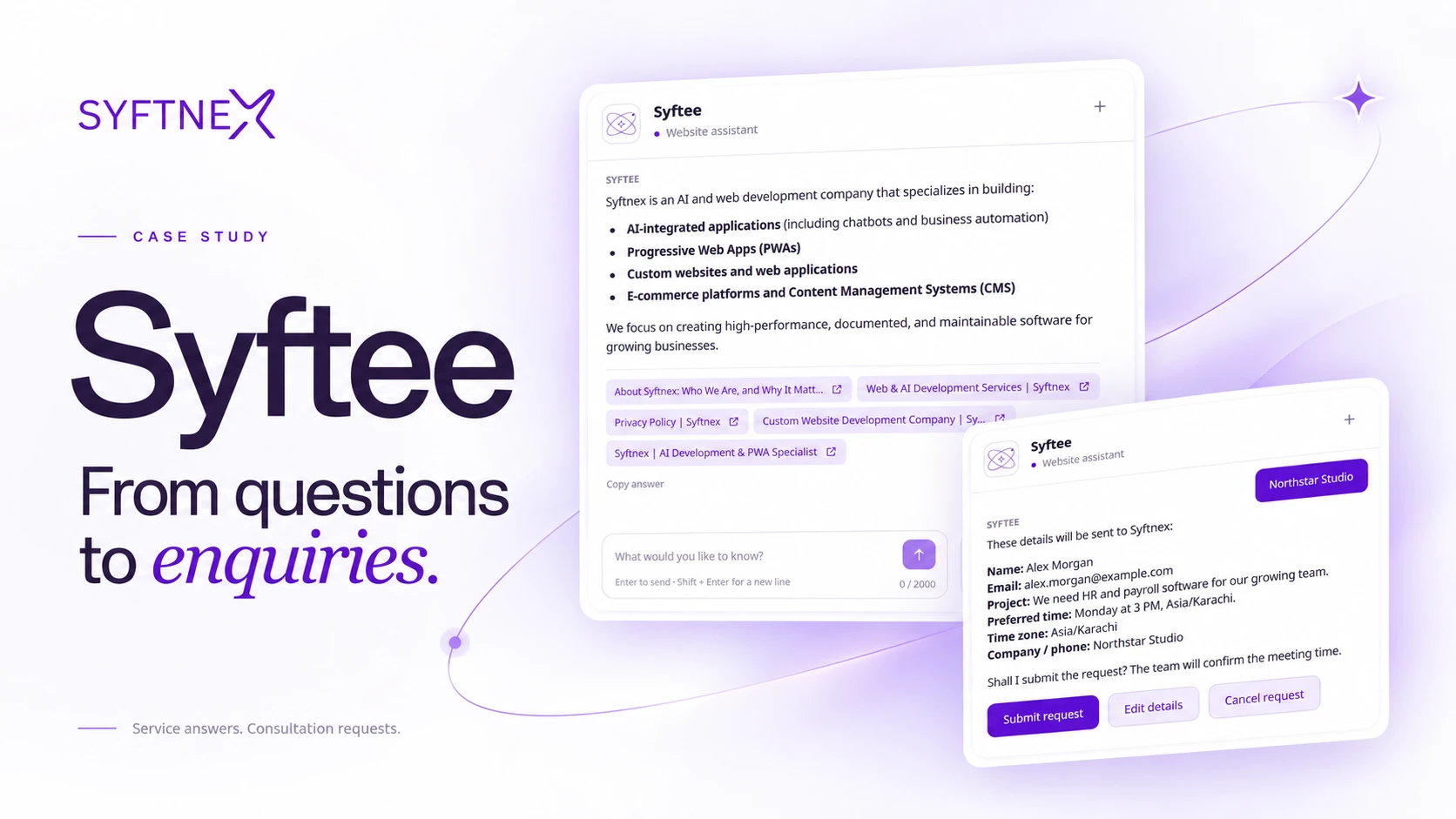
In the demonstration, Syftee gives an overview of our work, including AI-integrated applications, progressive web apps, custom websites and web applications, and e-commerce or content management platforms. The response presents those areas as a readable list rather than requiring the visitor to assemble an answer from several pages.
The answer also includes links to supporting pages. That connects the conversational explanation with the website content behind it, giving the visitor somewhere to go when they want more detail.
For this project, RAG supplies the business-information part of the experience. Collecting an enquiry adds another layer: the assistant has to move through a sequence of questions, retain the details provided and present them for review. Both parts matter to the journey shown in the demo.
Making answers easier to check with source links
One visible feature of Syftee is the group of source-page links displayed beneath its answer. These include relevant company and service pages from the Syftnex website.
For a visitor, the links make the response easier to explore. They can read the short answer in the chat, open a supporting page and continue learning about the service. The assistant becomes another way to navigate information that already belongs to the business.
A website chatbot with source links also gives the business a clearer review path. The response and its linked pages can be checked together when assessing whether an answer is useful and appropriate.
Sources still need maintenance. A link makes information inspectable; the underlying content needs to remain accurate as services and policies change. That is an ongoing content responsibility for any business using its website information in a conversational assistant.
The enquiry workflow, step by step
The central part of the case study is the transition from asking a question to preparing a consultation request. The demo follows a straightforward sequence, with each stage providing context for the next.
1. The visitor asks about the business
The conversation begins with a request for a brief explanation of what Syftnex does. This is a useful starting point because it reflects an early website visit: the person is still learning about the company.
Syftee responds with the service overview and source links. At this point, the experience serves an informational need. The visitor can read, explore the links or continue the conversation without first providing contact details.
That ordering keeps the first interaction approachable. The assistant demonstrates usefulness before the visitor chooses to share information for a follow-up.
2. The visitor asks for a discovery call
The next request is direct: the visitor would like to book a discovery call. Syftee asks whether they want to send a discovery-call request to the Syftnex team and presents a choice to continue.
This creates a clear transition into enquiry collection. Asking a question about the business and asking to be contacted are separate intentions, and the interface gives the visitor an explicit point at which to proceed.
The visitor can then continue within the chat. The request does not require them to restate their interest in a separate contact form during the demonstrated flow.
3. Syftee collects contact and project details
The assistant asks for the visitor's name and the email address that should receive confirmation. It then asks what project or service they would like to discuss.
The example enquiry concerns HR and payroll software for a growing team. That short description gives the future conversation a subject. It tells the team considerably more than a contact address alone.
The information is collected one question at a time. Each response contributes a field to the request, keeping the interaction focused on the detail currently needed.
For a service business, this is a practical form of enquiry capture: who is asking, how can they be reached, and what do they need help with? A salesperson or consultant can use that context when deciding how to respond.
4. The visitor provides a preferred time
Syftee then asks which day and time the visitor would prefer. The interface includes the time zone and explains that the team will confirm the final time. It also offers an "Anytime" option for a visitor whose schedule is flexible.
In the sample conversation, the visitor chooses Monday at 3 PM in the Asia/Karachi time zone. The assistant then offers the option to include company or phone information, with a way to skip those additional details.
This produces a request with scheduling context while keeping the next business action clear. The preferred time expresses what the visitor would like; the team still needs to confirm the arrangement.
5. The visitor reviews the request
Before the final confirmation, Syftee presents the collected information together. The review includes the name, email, project description, preferred time, time zone and additional company information provided in the demo.
The interface offers three actions: submit the request, edit the details or cancel. This review stage lets the visitor see the enquiry as a whole after answering the earlier questions individually.
It is also a useful point to catch a mistyped address, an unclear project description or a scheduling preference that needs changing. Giving the visitor a review step makes those details visible before they choose to proceed.
6. The conversation reaches a prepared consultation request
The walkthrough ends with a message that the discovery-call request is ready and the preferred time has been noted. It also refers to confirmation following submission to the team.
The workflow shown is therefore an AI chatbot for consultation requests, with final scheduling handled by people. The demonstration establishes the conversational preparation and review of that request; it does not show a calendar reservation or a delivered confirmation email.
Keeping that status clear helps set expectations. The visitor has provided the information needed for the next step, and the team retains responsibility for confirming when the meeting will happen.
Interface details that support the conversation
The experience is shaped by several small interface choices visible throughout the demo. Together, they make the progression easier to follow.
The assistant has a consistent identity: Syftee, presented as a website assistant. The conversation stays within the same branded panel as the visitor moves from general questions to an enquiry.
Choice buttons appear at points where a short decision is enough. Continuing with a call request, selecting a flexible time, skipping optional information and reviewing the final details all benefit from visible actions.
The distinction between required and optional information is also useful. Contact information and the project description give the enquiry its basic purpose. Additional company or phone details can add context without becoming a barrier for someone who prefers to skip them.
Finally, the review screen brings the earlier answers together. This gives the conversational experience a recognisable endpoint, with a clear account of the details the visitor has supplied.
These are the details a buyer can assess directly in the recording: the questions asked, the information collected, the available controls and the status communicated at the end.
What the demonstration establishes
The outcome of this build is a visible journey connecting service information with consultation-request preparation. The strongest evidence is the interaction itself.
Demonstrated capability | Practical purpose |
A service question receives a business-specific response | Helps a visitor understand what Syftnex offers |
Supporting page links appear with the answer | Gives the visitor a route to more detail |
The chat recognises a request for a discovery call | Moves the conversation into enquiry collection |
Contact and project details are collected | Gives the team information for a follow-up |
Preferred time and time zone are included | Adds context for arranging the conversation |
A review stage presents the collected details | Gives the visitor a chance to check the request |
The final time remains subject to team confirmation | Keeps the scheduling expectation explicit |
Commercial impact would need separate measurement. A completed demonstration is evidence of the workflow; changes in lead volume, sales conversion or administrative time would require operational data collected over time.
For a business assessing a similar assistant, this makes the demo a useful evaluation tool. It shows the actual visitor journey and provides a concrete starting point for discussing what should happen after an enquiry is prepared.
What we would measure as usage grows
The next layer of evaluation should follow the business journey shown in the video. Starting a chat is one event, while producing an enquiry that reaches the team is another.
A measurement plan could track how often visitors begin conversations, which questions they ask, whether they open source links and where they stop during enquiry collection. It could then distinguish requests that are only prepared from those whose successful submission is confirmed by the receiving system.
The team could also review enquiry quality. Does the project description explain what the visitor needs? Is the contact information usable? Does a preferred time make the follow-up easier to arrange?
Those observations would help decide what to improve: the available knowledge, the wording of a question, the number of details requested or the process used by the team after receiving an enquiry. They connect technical behaviour with a business outcome that can actually be assessed.
Where this approach can fit another service business
The same journey can be relevant to a consultancy, a development agency or another service business whose customers ask questions before requesting a discussion.
Each implementation would need its own reference content and enquiry requirements. A consultancy might collect the topic of a proposed engagement. A software business might ask about the system a customer wants to replace. An agency might need a short project brief before arranging a discovery call.
The useful starting point is to identify the questions visitors need answered and the information the team needs for a productive response. That defines a manageable first version of the assistant.
Additional integrations, such as CRM delivery or live calendar availability, should be scoped around the business's systems and operating process. The Syftee demonstration provides an example of the conversational journey; those further capabilities would need to be specified and verified for the individual project.
Frequently asked questions
What is a RAG chatbot for service enquiries?
It is a conversational assistant that uses retrieved business information to answer questions about services. In Syftee's case, that information supports an overview of Syftnex's work, with links to source pages and a route into a consultation request.
Can a RAG chatbot collect leads as well as answer questions?
Yes, an enquiry workflow can be added alongside the information-retrieval experience. The Syftee demo shows name, email and project details being collected in the chat. Useful lead capture also depends on the receiving process, including whether an enquiry is successfully submitted and followed up.
Does the demo show an automatically confirmed meeting?
The demo shows a consultation request with a preferred time and time zone. The interface states that the team will confirm the meeting time. The recording does not establish a reserved calendar slot.
What information does a service enquiry assistant need?
It needs reliable information about the business and a clear definition of the enquiry it should collect. Service descriptions, relevant FAQs and contact processes are sensible starting points. The business should also decide which details are required, which are optional and who handles the request afterwards.
Why include source links in chatbot answers?
Source links let visitors open the pages behind an answer and explore the information in more detail. They also make the relationship between the response and the business's published content easier to review. Keeping those pages accurate remains part of maintaining the assistant.
Build a clearer route from questions to enquiries
Syftee brings service answers and consultation-request preparation into the same conversation. A visitor can learn about the business, inspect supporting pages and provide the context needed for a follow-up discussion.
If you want a similar experience for your website, start with the questions customers ask and the details your team needs before speaking with them. Share those with us, along with the systems that should receive the enquiry.
Talk to Syftnex about your website assistant.
Built to ship. Documented to last.